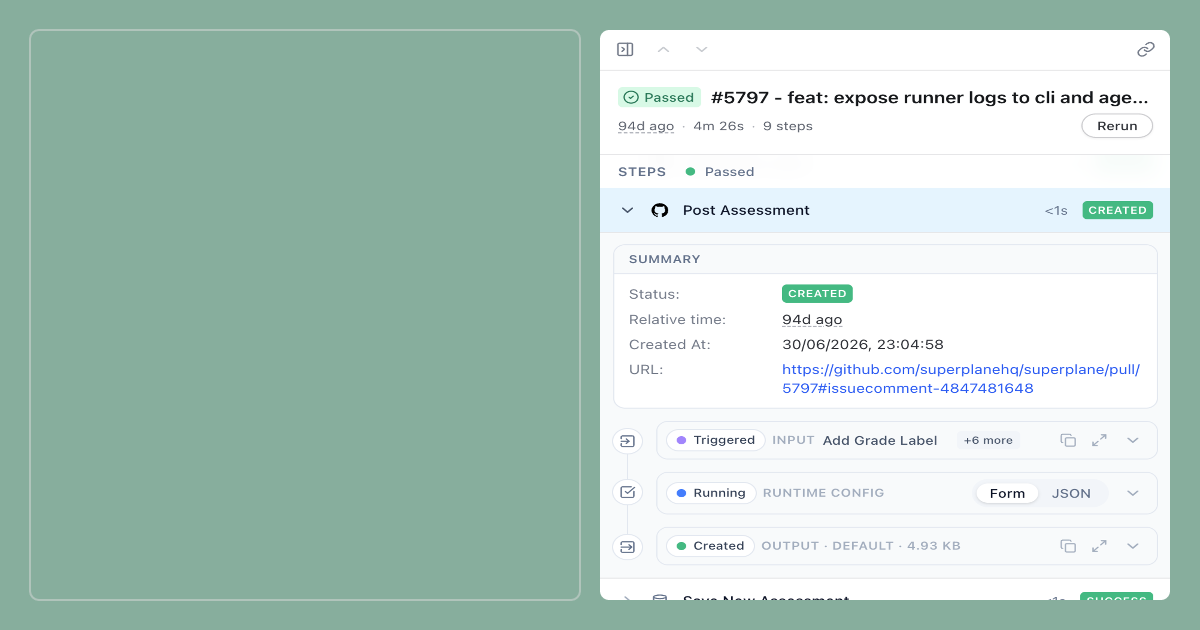
Just because you’ve managed to find a production problem, that doesn’t mean you’re done. Someone still has to determine what has gone wrong, gather the relevant evidence, find the code responsible for all this, understand how the system is supposed to work, come up with the fix, review it, and verify that the whole thing works.
Most engineering teams already have tools for this, but the problem is that the context is scattered across them all. Most teams already have the necessary tools, but the context is fragmented across GitHub Actions, internal documentation, Discord, and GitHub. Engineers still have to connect these sources manually.
This is where SuperPlane, your open-source software factory that helps you coordinate your work across different tools, standards, and review processes, can come in handy.
For this blog post, we’ve built a small demo around a production failure and asked a simple question “Can SuperPlane trace a checkout deployment failure caused by the application reading PAYMENT_TIMEOUT instead of PAYMENT_TIMEOUT_MS, confirm the regression using GitHub logs and Elasticsearch knowledge, pause for approval in Discord, and open a fix PR that passes the original checks?”
Here’s what the workflow looks like:
Detect → Investigate → Approve → Fix → VerifyYou don’t want the agent to start modifying production code whenever an alert fires. What you want instead is to turn an operational signal into a structured engineering workflow: collect the evidence, figure out what the issue is, propose a correction, pause for a human to make the call, and only then prepare the change for review.
The Workflow at a Glance
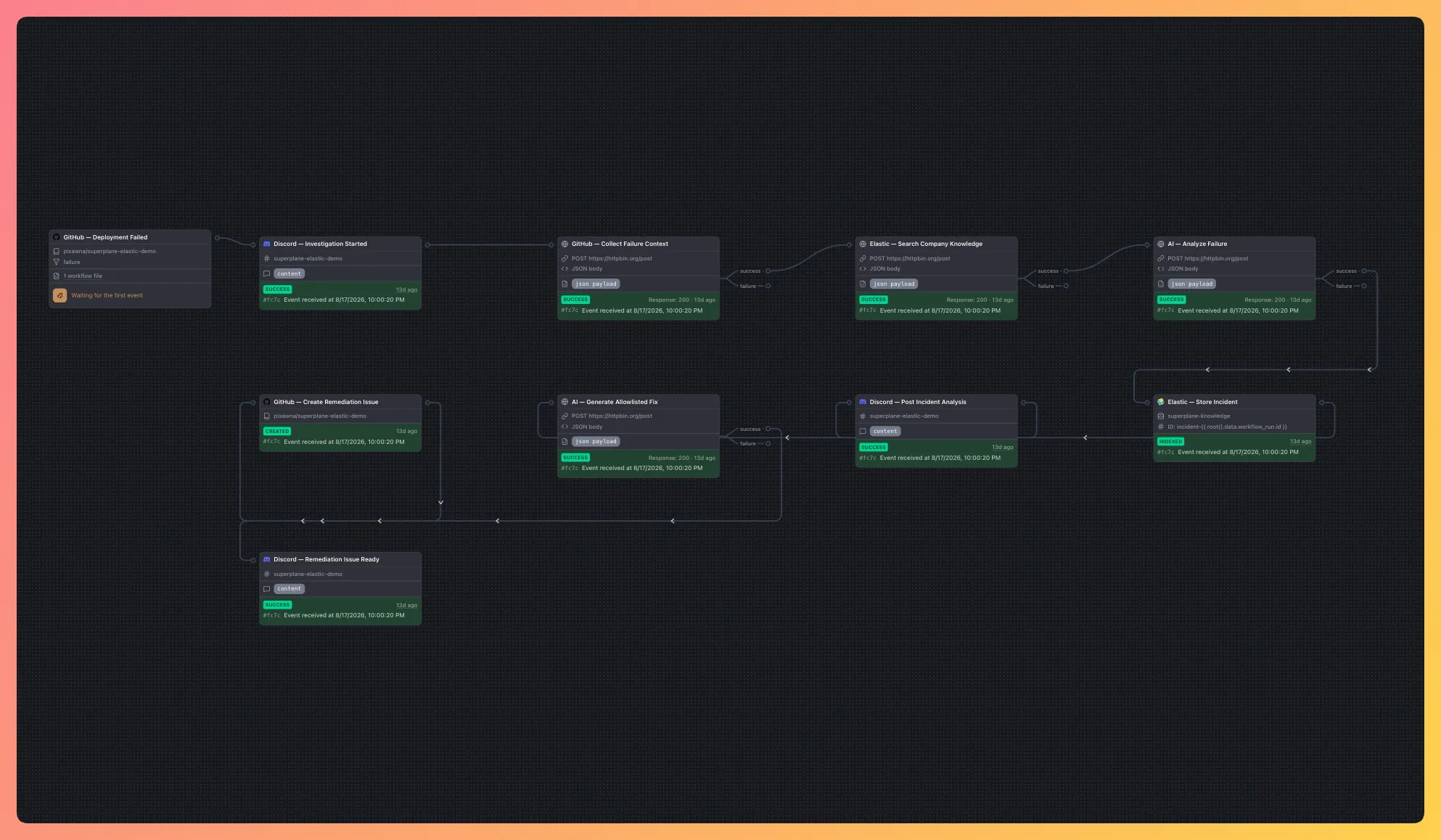
SuperPlane Canvas shows the complete incident workflow in one place, from the failed GitHub deployment through investigation, approval, remediation and verification. Each node exposes its inputs, outputs and current status. The following sections walk through each stage in detail.
Want to explore the implementation yourself? Check out the demo repository on GitHub
Connecting the Path: From Issue to Fix
The evidence needed to resolve this failure is distributed across GitHub Actions logs, Elasticsearch knowledge, Discord and the source code. SuperPlane coordinates these systems through one approval-gated workflow:
- Detect the failed GitHub Actions deployment
- Collect the failed GitHub Actions job, specific step, commit and relevant log lines
- Retrieve related runbooks and previous incidents from Elasticsearch
- Produce an evidence-backed incident analysis and proposed correction
- Ask an engineer to approve or stop the remediation
- Create a pull request and rerun the original deployment checks
SuperPlane manages the handoffs between these systems, but it does not modify code before approval or merge the resulting pull request.
The Experiment
We’ve created a small TypeScript checkout service.
This service requires a production configuration value:
PAYMENT_TIMEOUT_MS=1500Normally, the healthy implementation reads:
process.env.PAYMENT_TIMEOUT_MSTo simulate a realistic configuration error, we changed one line so that the application reads:
process.env.PAYMENT_TIMEOUTProduction still provides PAYMENT_TIMEOUT_MS, but the new variable doesn’t exist, so the service can’t start.
The scenario itself is intentionally simple because things start to get interesting after the failure.
This demo brings together:
- GitHub Actions for build, test, startup and smoke checks
- GitHub for source code and pull requests
- Elasticsearch for architecture documentation, runbooks, engineering history, and previous incidents
- OpenRouter for structured incident analysis and constrained fix generation
- Discord for questions, incident notifications, and human approval
- SuperPlane for coordinating their work across different tools, standards, and review processes.
For our purposes, GitHub Actions acts as the production boundary. It installs the project, builds it, runs the unit tests, starts the service with production configuration, checks the health endpoint, and hits the checkout API.
There’s no Kubernetes cluster, cloud deployment account, or container registry involved.
1. Make the Failure Observable
The workflow starts with a standard push to GitHub.
GitHub Actions then runs the deployment pipeline:
- Install dependencies.
- Compile TypeScript.
- Run unit tests.
- Start the service with the production environment variables.
- Check
/health. - Run a checkout smoke test.
The first three stages pass. Then, during simulated production startup, the application fails because it’s reading the wrong environment variable.
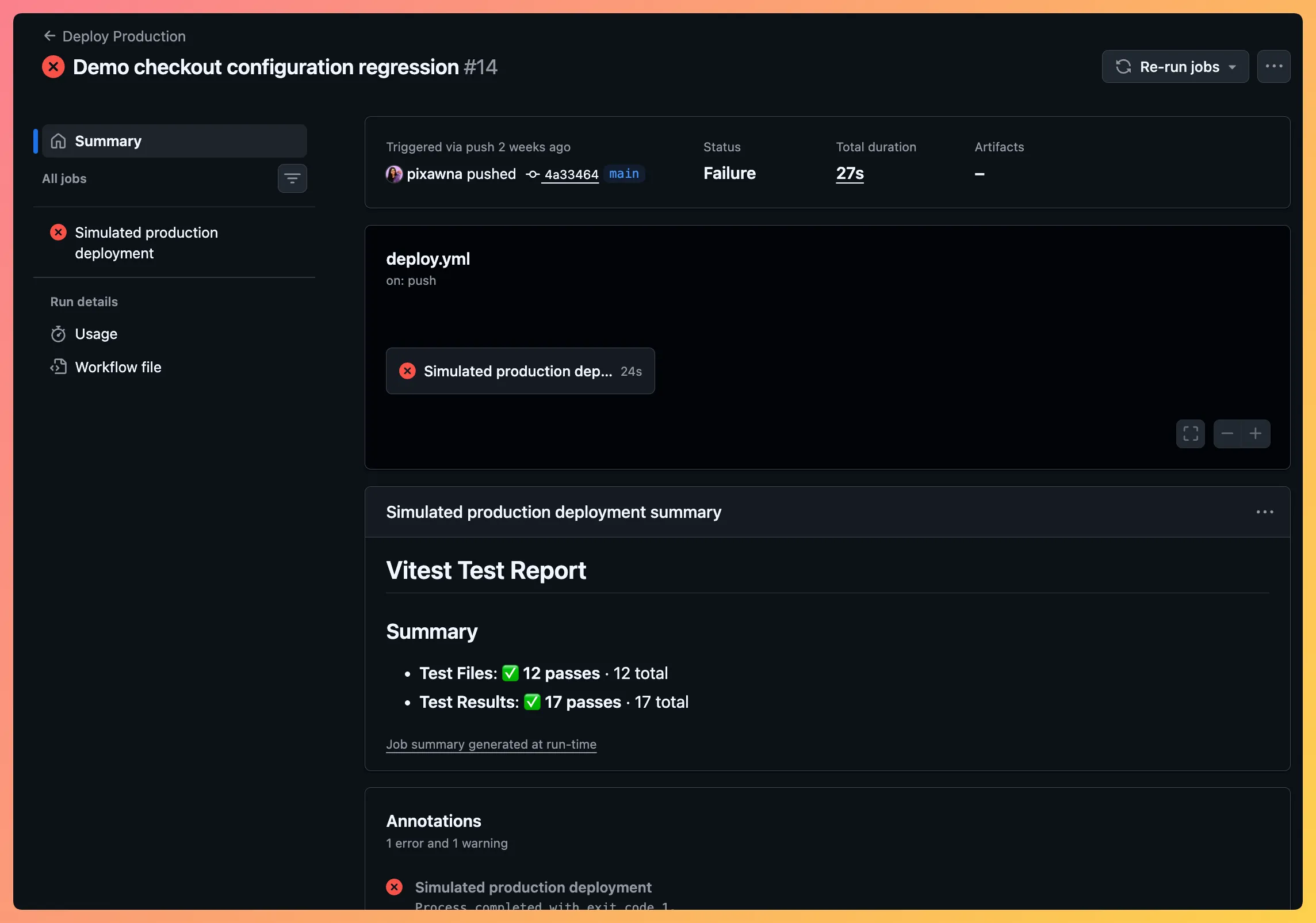
The log includes a specific error:
CONFIGURATION_ERROR: PAYMENT_TIMEOUT_MS is required for production checkout startupNow that’s a good detail because it helps you understand the failure. It’s not a generic red status with zero context, you’ve actually got something to work with.
2. Turn the Failed Deployment Into an Incident
When the GitHub Action fails, GitHub sends a signed workflow_run event to SuperPlane.
Before doing anything else, the service validates the webhook signature using a shared secret. Invalid signatures are rejected, malformed payloads are handled safely, and repeated deliveries are prevented from creating duplicate incidents.
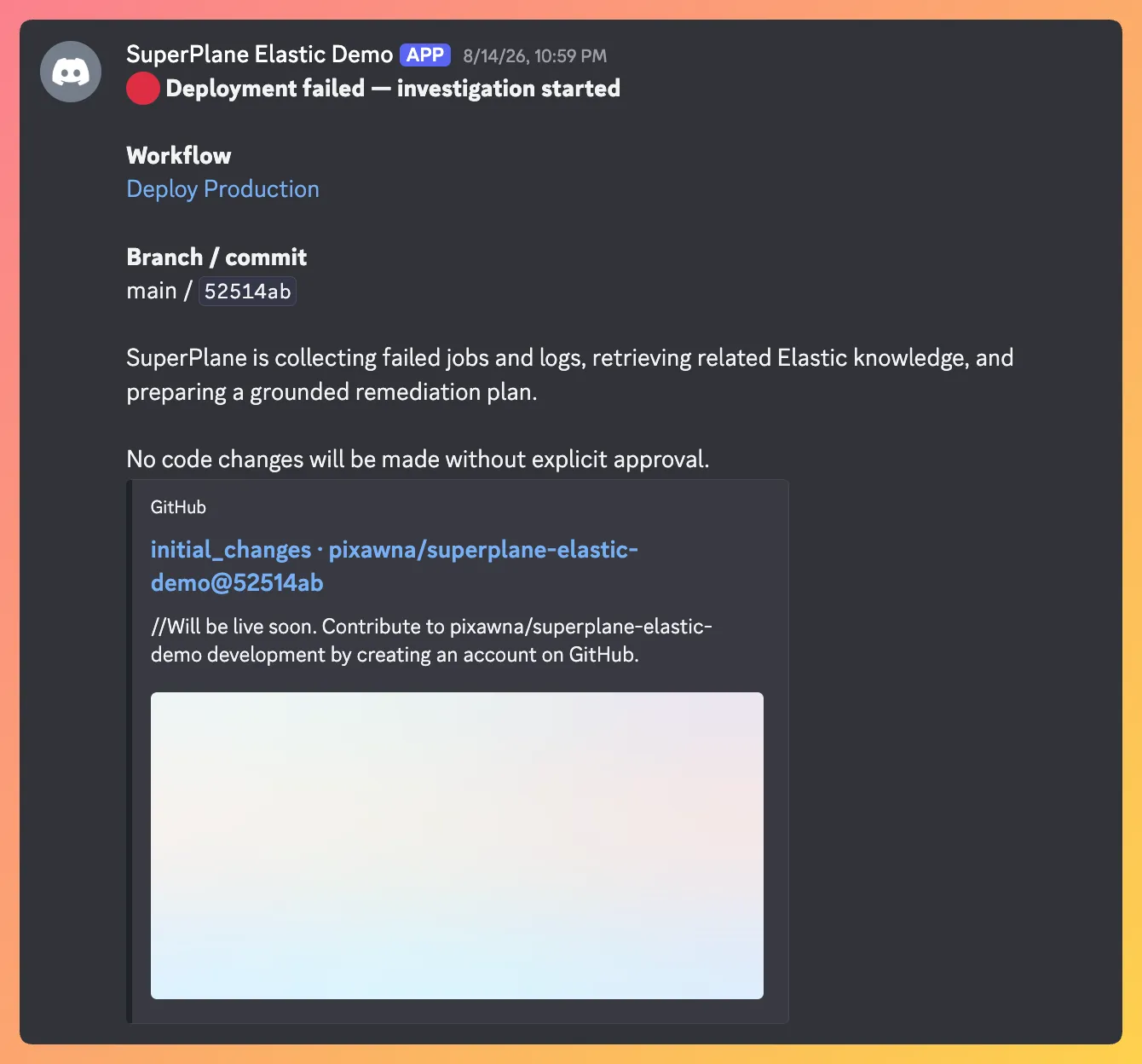
SuperPlane then posts an immediate update in Discord:
Deployment failed — Investigation started
This is intentionally separate from the final diagnosis. It lets the team know that the signal has been received and that work has started, but it doesn’t pretend that the root cause is already known.
The workflow then retrieves:
- Repository and workflow information
- Workflow run ID
- Branch and commit SHA
- Failed jobs
- Failed steps
- Relevant log output
It doesn’t send the entire raw log downstream. It strips ANSI formatting, keeps lines matching common failure terms, includes the final 35 lines for context, removes duplicates and caps the resulting log excerpt before retrieval or analysis.
This keeps the investigation focused and avoids turning a multi-megabyte CI log into an unstructured model prompt.
3. Add Operational Context with Elasticsearch
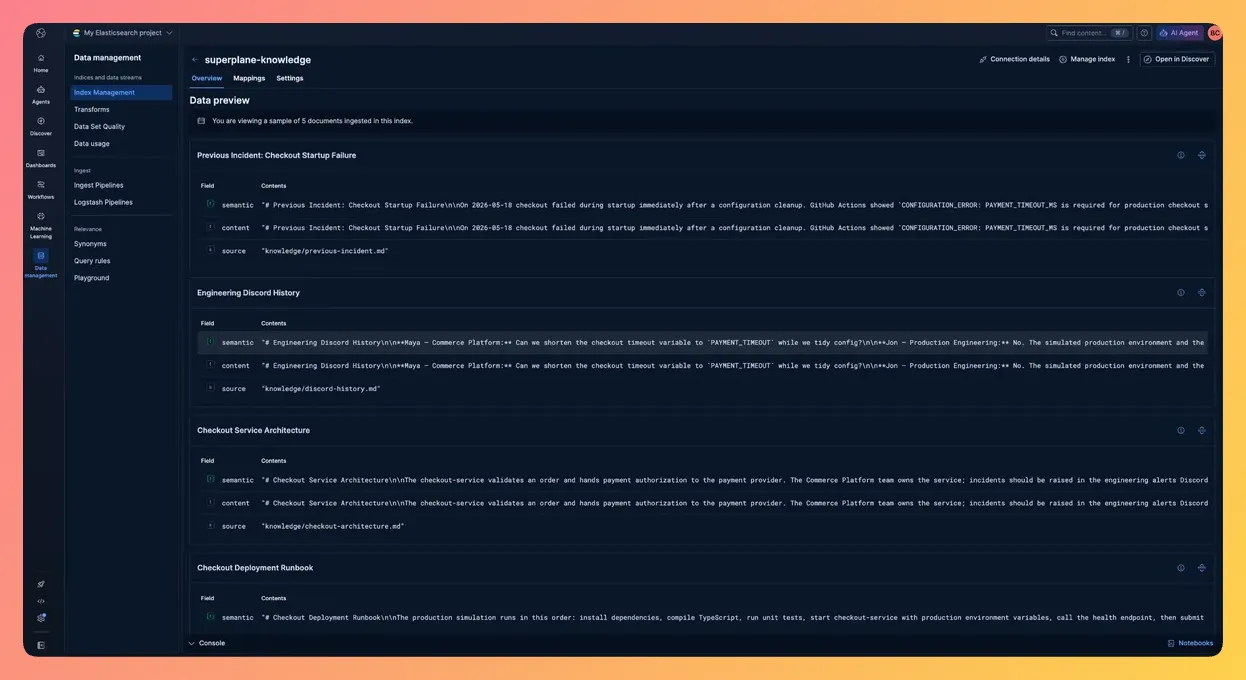
Logs tell us what has happened during this run, but they don’t necessarily explain how the service is supposed to behave. That context is found in Elasticsearch.
For this demo, the superplane-knowledge index contains four documents:
- Checkout service architecture → identifies the checkout service owner and states that production uses
PAYMENT_TIMEOUT_MS - Deployment runbook → documents the startup, health-check, smoke-test and configuration-troubleshooting process
- Previous checkout startup incident → records an earlier failure caused by reading PAYMENT_TIMEOUT instead of PAYMENT_TIMEOUT_MS
- Engineering conversation → captures the team’s agreement that checkout deployments must provide
PAYMENT_TIMEOUT_MS=1500
Each document keeps normal text fields alongside a semantic_text field. SuperPlane asks Elasticsearch to run lexical and semantic retrieval independently, and Elasticsearch combines the ranked results using Reciprocal Rank Fusion (RRF) before returning the five most relevant documents.
The query is built from the failed workflow, job and step names, and a small set of important log lines. It’s normalized and capped before it reaches Elasticsearch.
For this incident, Elasticsearch returns exactly the evidence the workflow needs:
- Production uses
PAYMENT_TIMEOUT_MS. - Deployment environments provide
PAYMENT_TIMEOUT_MS=1500. PAYMENT_TIMEOUTis not a supported configuration value.- A previous incident was caused by the same variable-name regression.
- The deployment runbook recommends checking configuration names when startup fails.
That’s the main difference between asking a model to guess based on an error message and supplying it with the organization’s actual operating context.
The same knowledge index also supports questions from Discord. An engineer can simply ask:
@superplane which timeout variable does checkout use?SuperPlane answers using only relevant context retrieved from Elasticsearch. The Discord response includes a Sources list naming the Elasticsearch documents used to support the answer, such as “Checkout Service Architecture” and “Checkout Deployment Runbook”
4. Separate Evidence from Inference
The workflow now has two kinds of information:
- Observed evidence from GitHub Actions
- Retrieved operational context from Elasticsearch
The model receives both and returns a structured incident analysis:
{
  "summary": "The checkout service failed during production startup.",
  "likelyRootCause": "The application reads PAYMENT_TIMEOUT while the deployment provides PAYMENT_TIMEOUT_MS.",
  "confidence": 0.98,
  "affectedFiles": [
    "apps/demo-service/src/config.ts"
  ],
  "suggestedFix": "Restore the PAYMENT_TIMEOUT_MS environment variable lookup.",
  "evidence": [
    "GitHub Actions startup log",
    "Checkout Service Architecture",
    "Checkout Deployment Runbook",
    "Previous Incident: Checkout Startup Failure"
  ]
}
The schema is validated before the analysis is accepted.
More importantly, the workflow preserves the clear distinction between:
- What has been observed
- What has been inferred
- What should be done next
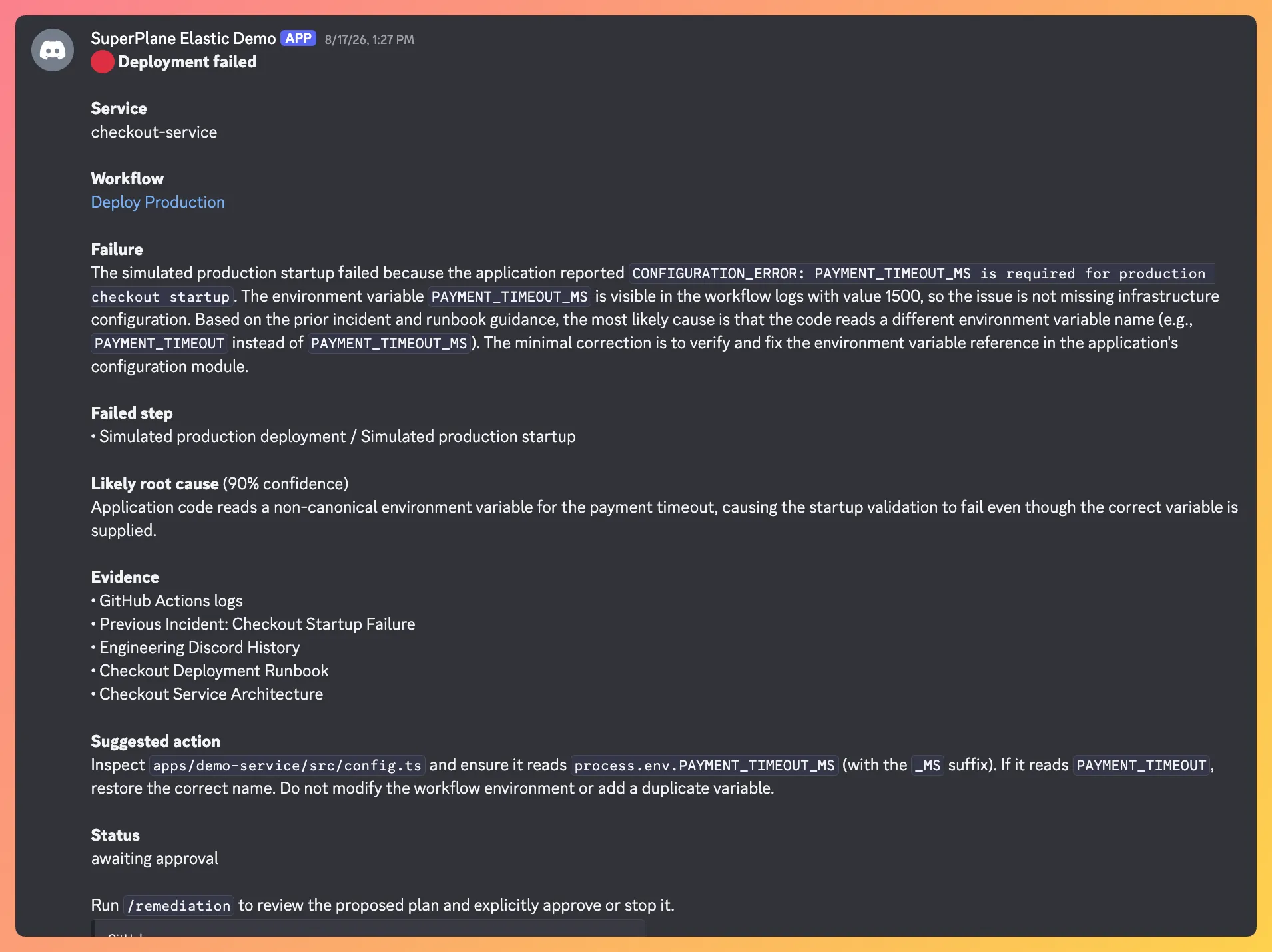
Discord then receives the completed incident report that includes the failed step, likely root cause, confidence, supporting sources, and proposed action.
5. Stop Before Changing Code
At this point, the workflow has enough information to propose a fix, but it still doesn’t have permission to modify the repository.
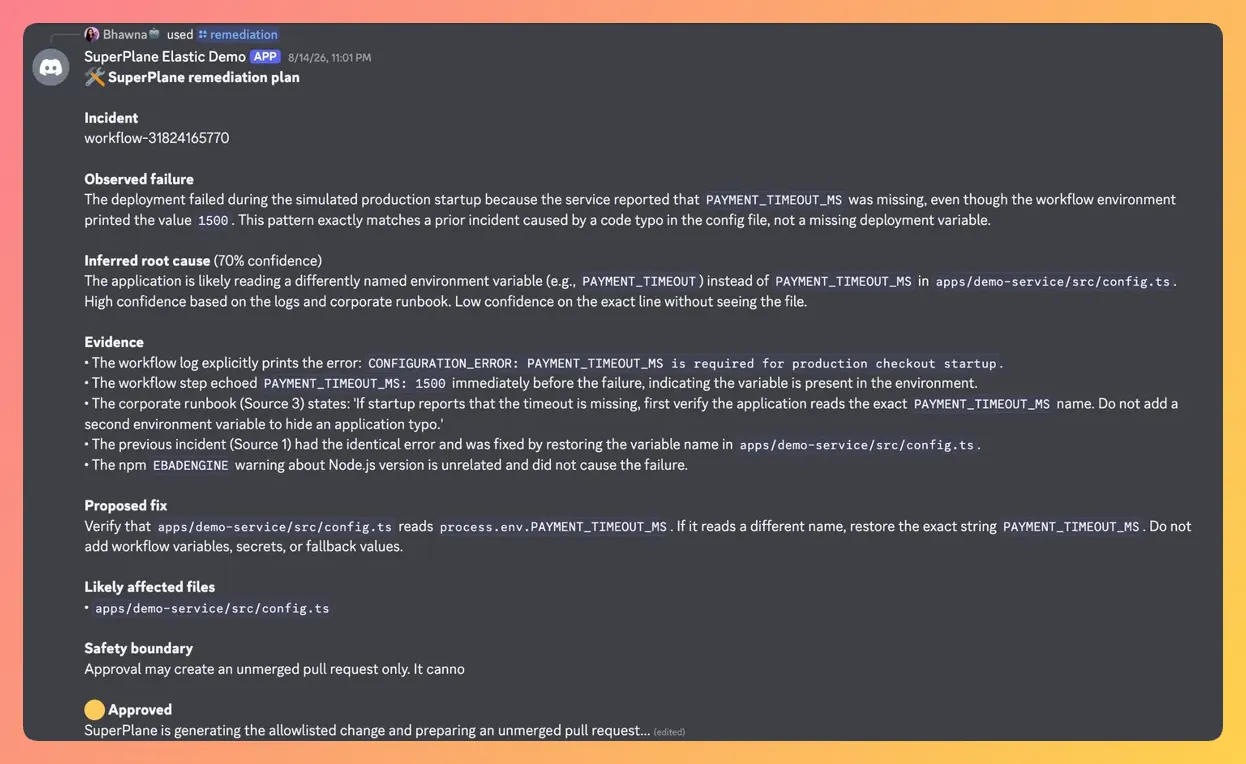
A person must run:
/remediationDiscord then presents the remediation plan with two explicit choices:
- Approve and create PR
- Stop (no changes)
Choosing Stop ends the workflow, and no branch, commit, code change, or pull request is created. Choosing Approve authorizes a tightly constrained next step: prepare an unmerged pull request.
Only the person who has requested the remediation review can make this decision.
It’s important to note that this boundary is intentional. While detection and investigation can be automatic, repository modifications still need to be greenlit by a human.
6. Generate the Smallest Correction Possible
After approval, SuperPlane retrieves source files that are likely to be affected from GitHub.
The model receives:
- Structured incident analysis
- Selected GitHub failure evidence
- Relevant knowledge from Elasticsearch
- Contents of the affected source files
It’s instructed to make the smallest correction supported by the evidence.
The output is validated again before it reaches GitHub. Generated changes are restricted to TypeScript files under:
apps/demo-service/src/The model cannot modify:
- GitHub Actions workflows
- Secrets
- Authentication code
- Webhook verification
- Arbitrary repository paths
For this incident, the fix is a single line:
- const timeout = env.PAYMENT_TIMEOUT;
+ const timeout = env.PAYMENT_TIMEOUT_MS;
SuperPlane creates a branch, commits the change, and opens a pull request. It never merges the PR.
The pull request includes:
- Incident summary
- Likely root cause
- Supporting evidence
- Proposed correction
- Original workflow URL
- Statement that the change was generated by the demo after explicit approval
Discord then receives the pull request URL and reports that checks are pending.
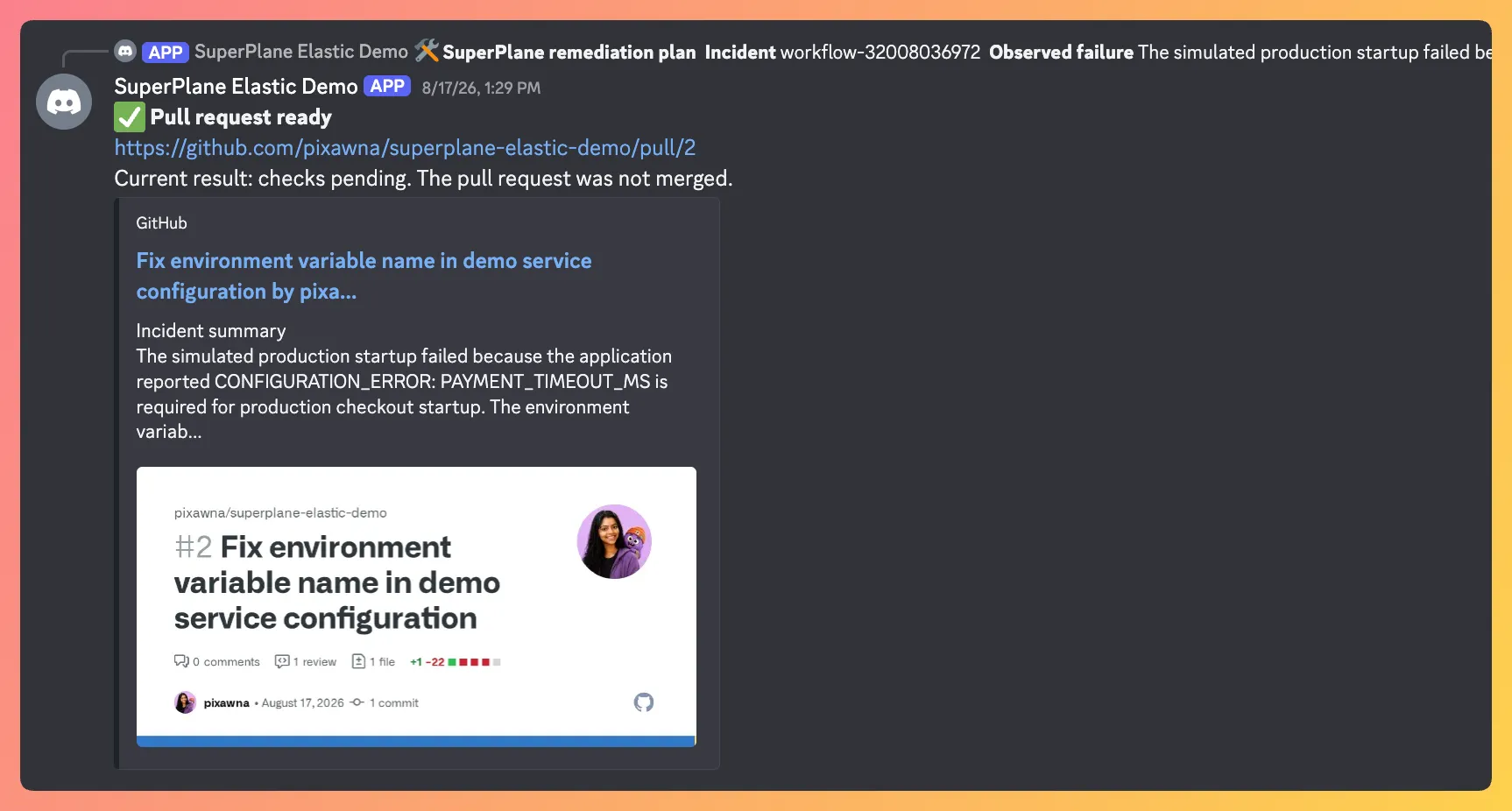
7. Verify the Correction
A pull request has been created, but the workflow is not done.
The existing GitHub Actions pipeline runs again against the fix branch. This time:
- Dependencies install.
- TypeScript compiles.
- All tests pass.
- The service starts with
PAYMENT_TIMEOUT_MS=1500. - The health check succeeds.
- The checkout smoke test returns the expected timeout.
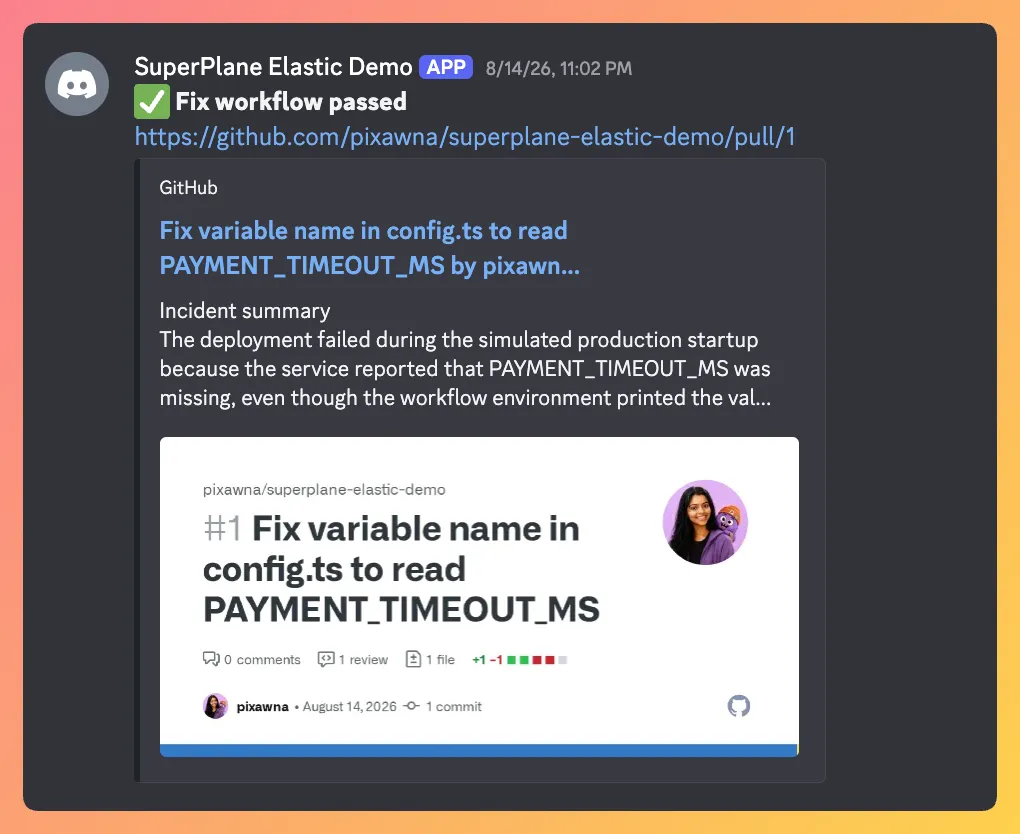
The same checks that caught the regression now verify that the fix works.
Discord receives the final result, while the pull request remains open for normal engineering review.
The incident moves through five controlled stages, ending with verification:
Detect → Investigate → Approve → Fix → VerifyThe production signal has gone through a controlled process and arrived as a grounded, reviewed, and verified engineering change.
Take the Automation Conversation Offline
We’ll be hosting two events with Elastic, one in London and one in New York, where we’ll talk about automation and the idea of a software factory.
You’ll see how a production failure can move through investigation, human approval, remediation and verification using SuperPlane and Elastic.
Software Factory with SuperPlane & Elastic (London)
September 1, 2026
Davidson Building, London
Join us for live demonstrations and a practical discussion on connecting production signals, engineering context, agents, and review workflows.
Apply here : https://luma.com/you-8r5c
Software Factory with SuperPlane & Elastic (New York)
September 17, 2026
1250 Broadway, Floor 16, New York
See how production failures can go from investigation to remediation and verification, while engineers stay in control.
Apply here : https://luma.com/you-9pwk
Join the SuperPlane Community
SuperPlane is open source. If you want to follow what we’re building around automation and production workflows:
- Star SuperPlane on GitHub
- Join the SuperPlane Discord community
- Come meet us in London or New York
The focus is shifting away from how quickly an agent can produce code. The next generation of engineering automation will be defined by how safely software organizations can turn real production signals into reviewed, verifiable changes.